Product leadership × practical AI

How product leaders actually use AI to ship faster.

I'm a product leader documenting the real AI workflows behind discovery, specs, data, and launches. Not generic prompt tips. The actual work, written down.

About

A decade at the seam of education and technology.

I started inside online learning and worked my way up through product, which means I understand the end user from the ground floor and the platform from the inside. Ten-plus years later, that combination is still the thing that sets the work apart.

Today I lead product at K12 Tutoring, where I built the company's first AI product roadmap and shipped its first AI feature. Before that I drove Education Cloud's expansion into K-12 at Salesforce and steered a complex platform migration. The throughline across all of it: I take ambiguous, messy product problems and ship them clean, and I'm genuinely good to build alongside.

What's different now is AI, and not as a buzzword. I use it every day to move faster: writing specs by voice, drafting engineering-ready tickets, reasoning about data, building prototypes in minutes. This site documents how I actually do that. Real workflows, real artifacts, real outcomes. Not how to prompt. What it looks like to ship.

Selected work

Real things I've shipped with AI.

How I decide what to hand to AI: Repetitive· Rules-based· Return
Rapid prototyping · stakeholder feedback

The new whiteboarding

Designers are a shared resource, and their time belongs on brand and product, not on throwaway concept sketches. So when I need something visual to pressure-test an idea with stakeholders, or to put in front of users before we commit engineering time, I build the mock myself with AI. A still image when that's enough. A clickable prototype when the idea needs to be felt.

It collapses what used to take hand-drawn sketches, Miro boards, and a slot in the design queue into minutes. And it produces a real file. I can sit with a designer and update the mock live in the same meeting, then take it into real design once we know the concept holds. This doesn't replace design. It protects it, and it makes sure the thing we build is the thing users actually need.

Live prototype Open full prototype ↗

Live prototype built with AI (Claude / Figma Make / Lovable). Interactive — click around, or open it full-screen.

Workflow automation · GPT to Rovo

Release notes, from custom GPT to automated

Release notes are a tax you pay every cycle: export the tickets, then translate a wall of CSV rows into something a human can read. It's repetitive, rules-based, and the time back is real, all three of my Rs, which made it an obvious first target.

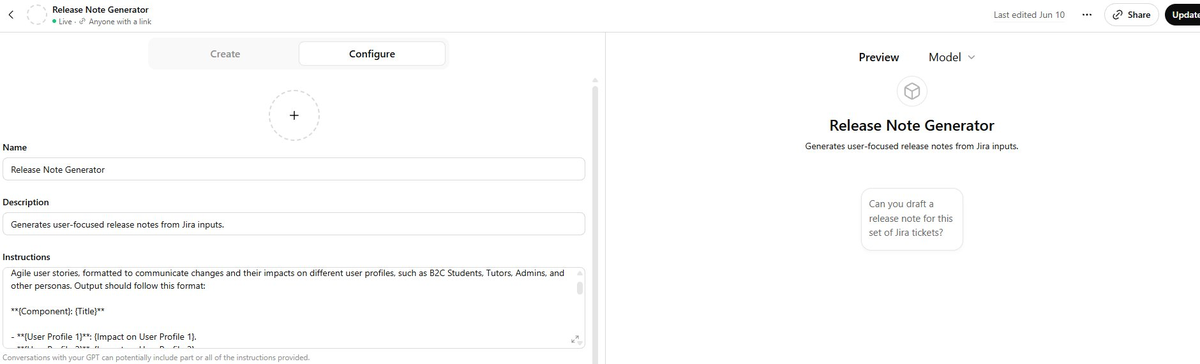
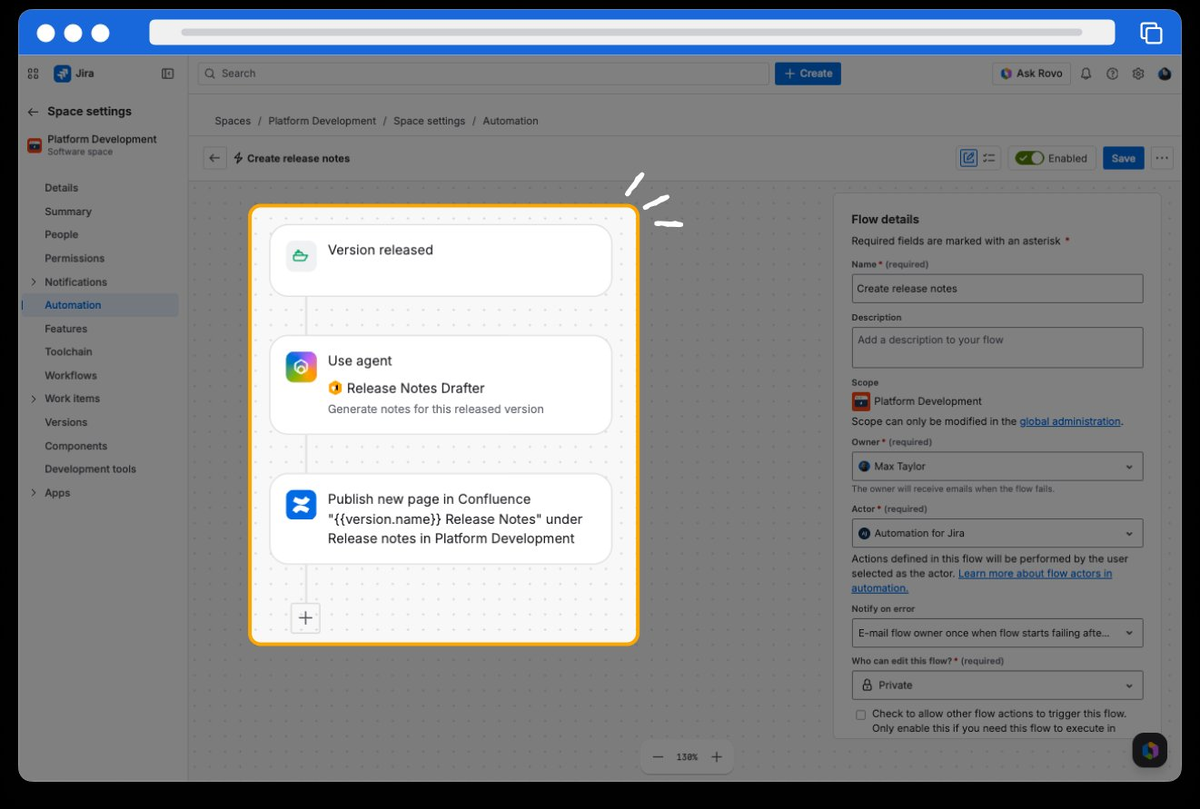
I built a custom GPT that turned a Jira export into clean, persona-aware release notes, trained on ten "golden" examples until the output was reliable, then shared it with the whole team behind one rule: proofread every time. As the tooling matured, I moved the whole workflow into Rovo inside Jira, where it now drafts notes automatically off the released version.

Drafting time ≈ 3 hrs → 15 min
The custom Release Note Generator GPT, configured to produce user-focused release notes from Jira inputs.

The custom GPT I built — my own configuration and format.

An Atlassian Rovo automation that drafts release notes when a version is released and publishes them to Confluence.

Where it lives now: a Rovo automation in Jira. Source: Atlassian

Voice-first spec writing

Talking specs into existence

User stories, defects, epics: they all have to be airtight. A spec gets handed from product to engineering to QA and back, and every ambiguity is a round-trip. So even when the real problem is "the button's broken," the writing it takes to make that unmistakable is real work.

I've taken the typing out of it. For each deliverable I keep a Claude project with a pre-built prompt that enforces the exact structure I want, formatted to paste straight into Jira. Then I just talk, and speech-to-text feeds it in. If anything's vague, the AI asks me targeted questions before it writes a line. And when a section needs something only a human can supply — a technical diagram I'll build later with an architect — it doesn't invent it. It leaves the slot marked TBD, so the gap stays visible instead of quietly filled with something made up.

What I say (speech-to-text)

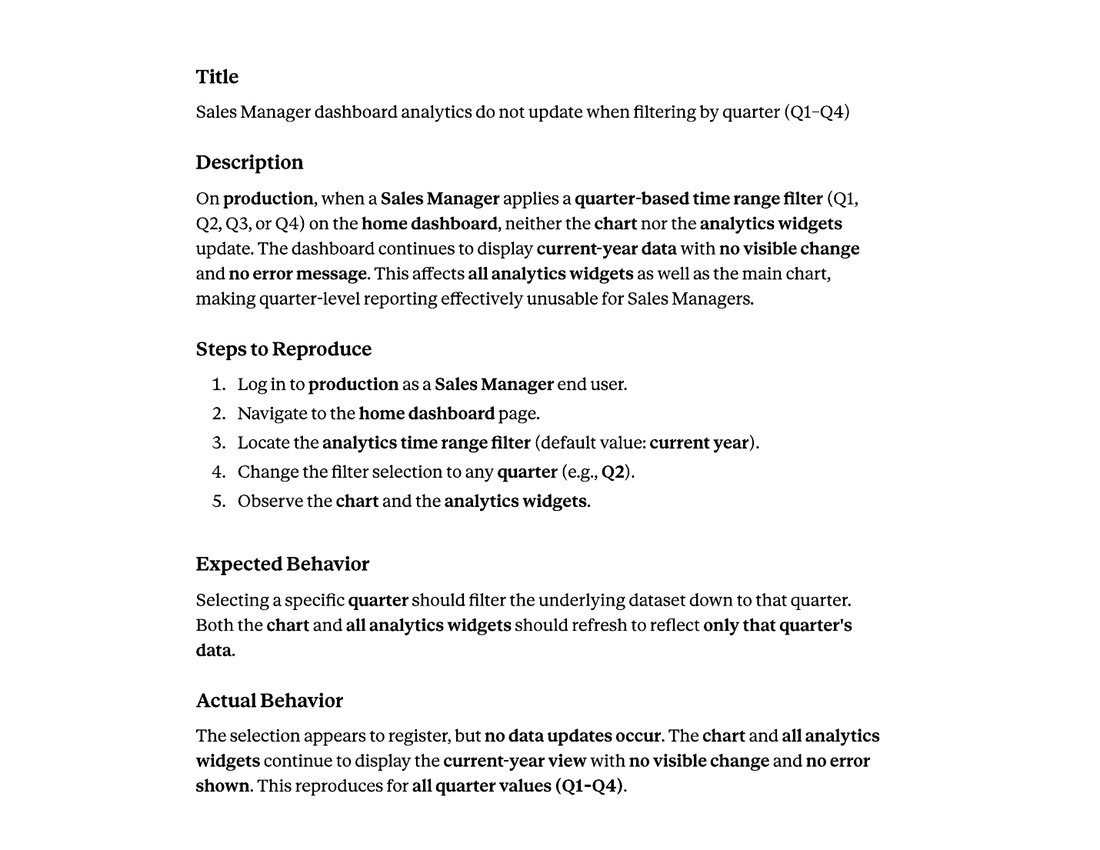
"When a Sales Manager logs in to production and goes to the analytics filter and updates it from current year to Q2, the graph and widgets don't update. There's no visible change. What should happen is all the analytics filter down to that quarter…"

The polished defect ticket the AI produced: title, description, steps to reproduce, expected and actual behavior.

What comes back: a clean, paste-ready defect ticket. Same method runs my epics and user stories.

AI product strategy · shipped feature

AI Academic Summary — the company's first AI feature

The company was new to building with AI, and the temptation when you're new is to chase the flashiest idea. I ran the candidates through my three Rs instead, and the academic summary won.

Every virtual session already produces a transcript. Off-the-shelf agents turn that into generic meeting minutes. We didn't want minutes, we wanted to know what was actually being taught. So I shipped a feature that reads the transcript and extracts the academic topics covered, as structured data we could hand to the teacher, the student, their parents, and the school or district. One feature, a whole chain of audiences.

The reason I pushed it first wasn't just the payoff, it was that it was a foundation. Every summary it generates also becomes stored data, the groundwork for pairing academic summaries with teacher feedback to draft the next session's lesson plan — tracking where a student was, where they are now, and where we're trying to get them.

Live prototype Open full prototype ↗

Interactive prototype of the Academic Summary review-and-send flow.

Product vision · intelligence dashboard

One screen, the whole user

On most platforms a user's information is scattered. One page for this flow, another for that feature, a separate screen just to manage the account. You never actually see the whole person in one place.

This dashboard pulls it together: who the user is, the account controls you need, their real interactions, and the data points that matter, all on a single page. Then it layers AI on top — strengths, areas to improve, a risk status, recommendations — generated from everything the platform already knows. Once a user's full picture lives in one place, AI can actually answer questions about them and suggest what to do next, instead of guessing from a fragment. And the same pattern scales from one student to an entire business account.

A student intelligence dashboard consolidating profile, account controls, AI-generated strengths and areas for improvement, attendance and engagement trends, and a sessions summary on one screen.

Built in Figma Make. Demo data only.

Background

The track record behind the workflows.

Mar 2023 – Present

Principal Product Manager (Director-level)

K12 Tutoring · Remote

Lead product strategy and execution for a B2C/B2B SaaS platform. Drove 2x year-over-year B2B customer growth, established the company's first AI product roadmap and shipped its first AI features, took over the engineering roadmap through a leadership gap, and led platform scalability and stability work to support rapid growth.

Jan 2019 – Mar 2023

Product Manager

Salesforce · Remote

Owned product strategy for Education Cloud, a multi-vertical SaaS platform. Led its expansion into K-12, defined how distinct education verticals share one platform architecture, and drove planning for a complex multi-phase migration to the next-generation platform.

May 2018 – Jan 2019

Product Owner

Glynlyon Inc. · Gilbert, AZ

Owned the product vision and backlog for K-12 education solutions, translating market research and customer feedback into prioritized requirements that improved learner outcomes.

2012 – 2018

Product & technology leadership

SNHU · Motivis Learning · VLACS

Director of Product Management at Southern New Hampshire University, Product Director at Motivis Learning, and Director of Technology at a fully online charter school — progressing from instructional design into technology leadership. The ground floor that taught me the end user.

Education
  • MS, Information Technology — SNHU, 2018 · GPA 4.0
  • BA, Education — Arizona State University, 2009 · GPA 3.78
Certifications
  • Pragmatic Institute Certified (PMC-III)
  • Certified Scrum Product Owner (CSPO)
  • Certified Scrum Master (CSM)
  • Salesforce Trailhead Ranger
AI & prototyping
ClaudeChatGPTGeminiLovableFigma MakeMermaid.aiWispr Flow
Tools
Jira / ConfluenceRovoSalesforceSnowflake / SQLFigmaAsanaSmartsheetMonday.com
Off the clock

Chandler, Arizona.

I'm a husband and father to four, and family is the center of it for me. Most of my favorite time is the time I spend with them.

The rest goes to the desert. People underestimate the Sonoran, but there's a surprising beauty out here, and I hike it whenever I can. My favorite trails run north toward Flagstaff, where you'll be moving across rock and dry desert and then a creek appears, the vegetation explodes, and you're suddenly walking through a strip of oasis. That contrast never gets old.

Newsletter

One useful issue a week on AI for product people.

The real workflows behind discovery, specs, data, and launches. What I actually did, and what I learned.

No spam. Unsubscribe anytime.

© 2026 Jason Fitzpatrick · Chandler, AZ LinkedIn  ·  Email